
leave a message
If you are interested in our products and want to know more details,please leave a message here,we will reply you as soon as we can.

How to Synchronize Clocks Across Multiple Buildings
Synchronizing multi clocks across multiple buildings can be challenging for schools, hospitals, corporate campuses, factories, government facilities, and other large organizations. When dozens or hundreds of clocks are installed across different buildings, manually setting each clock is inefficient and can lead to inconsistent time displays.
A network-based NTP clock synchronization system provides a more reliable solution. By connecting digital clocks to a centralized NTP server through an IP network, clocks in different buildings can automatically maintain accurate and consistent time.
Thus it makes possible to synchronize and control many clocks across multiple buildings via NTP time synchronization system. The NTP PoE clocks and NTP WiFi clocks can be used to build a scalable multi-building clock system.
Why Is IP Clock Synchronization Important Across Multiple Buildings?
In a single building, a few seconds of time difference between clocks may not seem significant. However, in a large campus or multi-building facility, inconsistent clock times can create operational problems. For example, a university may have digital clocks installed in classrooms, laboratories, libraries, administration buildings, sports facilities, corridors, meeting rooms. If every clock operates independently, clock drift and manual configuration can gradually cause different clocks to display different times. Accurate and synchronized digital clocks are particularly important for organizations that depend on precise schedules, including schools and universities, hospitals and healthcare facilities, manufacturing plants, government buildings, airports and transportation facilities, corporate campuses, warehouses and logistics centers. A centralized clock synchronization system ensures that all connected clocks use the same reliable time reference.
What Is a Multi-Building Clock Synchronization System?
A multi-building clock synchronization system connects many clocks in different buildings to a common network time source.
The basic architecture is:Time Source → NTP Server → IP Network → Digital IP Clocks
A typical system can be structured as follows:
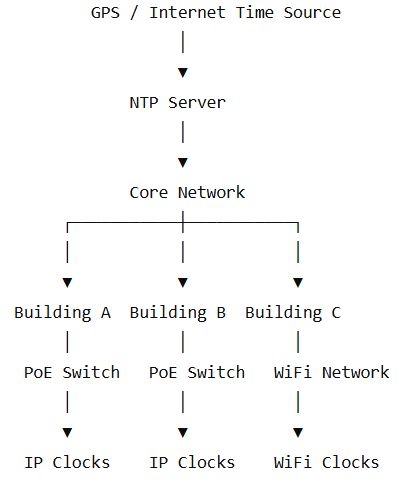
The NTP server provides the reference time, while the network digital clocks synchronize their internal clocks with the NTP server.
How Does Network Clock System Work?
NTP (Network Time Protocol) is a network protocol designed to synchronize the clocks of computers, servers, and network-connected devices.
In an IP clock system, the NTP server provides the reference time, the digital IP clock acts as an NTP client, the network provides communication between the server and clocks.
The synchronization process generally works as follows:
Because the clocks communicate over an IP network, they do not need to be connected to the same physical network switch. As long as the network allows communication with the NTP server, the clocks in different buildings can synchronize to the same time source.
How to Synchronize Digital Clocks Across Multiple Buildings
A reliable multi-building clock synchronization system typically involves five steps.
1. Choose a Reliable Time Source
The first step is to determine where the system will obtain accurate time.
Common time sources include GPS/GNSS, Internet NTP servers, local NTP servers, other trusted reference time sources. For applications requiring high reliability, a GPS-based NTP server can provide an independent and accurate time reference for the entire facility. for smaller installations, an Internet-based NTP server may also be suitable. The choice depends on the required accuracy, network architecture, Internet availability, and application requirements.
2. Install a Central NTP Server
The NTP server acts as the central time source for the digital clock system.
A typical architecture is GPS Antenna → NTP Server → Network → Digital IP Clocks
The NTP server can be installed in a central server room, network control room, or another secure location. Once configured, the same NTP server can provide time synchronization to digital clocks installed across multiple buildings. For critical applications, organizations can deploy primary and secondary NTP servers to improve system availability.
3. Connect All Buildings to the IP Network
The buildings must have suitable network connectivity. For example:
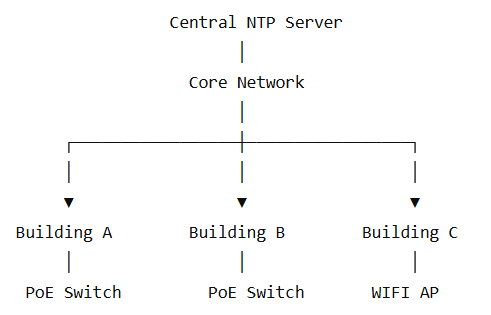
The network should allow the digital clocks to communicate with the NTP server. When designing the network, need to consider IP addressing, VLAN configuration, Network routing, Firewall rules, NTP traffic, DHCP or static IP addresses, Network redundancy, Network security. A properly designed network is essential for reliable multi-building clock synchronization.
4. Install Network Digital Clocks
After network connectivity is established, network clocks can be installed throughout the buildings.There are two common types of network clocks:
PoE, or Power over Ethernet, allows a digital clock to receive power and network communication through an Ethernet cable. A typical architecture is NTP Server → Network → PoE Switch → PoE IP Clock. PoE digital clocks are particularly suitable for new buildings with structured Ethernet cabling.
WiFi clock connect to the organization's wireless network and communicate with the NTP server through the IP network. The architecture is NTP Server → LAN → WiFi Network → WiFi IP Clock. WiFi IP clocks are useful when installing new Ethernet cabling is difficult or expensive.
Both PoE and WiFi clocks can be part of the same network clock synchronization system.
5. Configure NTP and Time-Zone Settings
Each digital IP clock should be configured with the appropriate network and time settings.
Typical settings include NTP server address, Secondary NTP server, if supported. Time zone. Daylight Saving Time settings, Display format, IP address, Network parameters. Once configured, the clock can automatically synchronize with the NTP server.This significantly reduces the need for manual clock adjustment.
Can One NTP Server Synchronize Clock in Multiple Buildings?
Yes. One centralized NTP server can provide a common time reference to the network clocks across multiple buildings, provided the network architecture allows the clocks to communicate with the server.
For example:
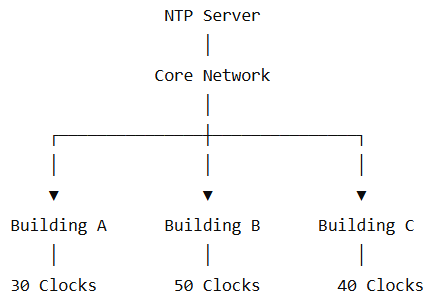
The actual number of IP time clocks supported depends on factors such as NTP server performance, Network architecture. Synchronization intervals, Network bandwidth, Number of NTP clients, System design. For larger or mission-critical installations, multiple NTP servers can be used for redundancy and improved reliability. Therefore, a separate NTP server is not necessarily required for every building.
Compared with manually configured standalone clocks, a network-based clock synchronization system provides several important benefits.
• Automatic Synchronization
Digital clocks automatically synchronize with the designated NTP time source.
• Consistent Time
Clocks across different buildings can maintain a common and accurate time reference.
• Centralized Management
Multiple clocks and buildings can be managed as part of one network clock system.
• Scalability
Additional buildings and digital clocks can be added as the organization grows.
• Flexible Connectivity
PoE and WiFi technologies provide different installation options depending on the building infrastructure.
• Reduced Maintenance
Automatic synchronization reduces the need for technicians to manually adjust clocks.
SeedlingNet Digital Clock Synchronization Solutions
SeedlingNet provides network-based time synchronization solutions for organizations that need accurate and consistent time across multiple locations. A typical SeedlingNet network clock system can combine NTP Server + PoE IP Clocks + WiFi IP Clocks + Network Management. This architecture allows network time clock installed in different buildings to synchronize with a common NTP time source. SeedlingNet IP Clock System can be applied to various fields including schools and universities, hospitals, government facilities, factories, corporate organization, manufacturing warehouses, transportation facilities. The system can be designed according to the site's network infrastructure, number of clocks, time synchronization requirements, and installation environment.


 IPv6 Network Supported
leave a message
Scan to Wechat/Whatsapp :